1
FX Configurator-FP
7 Read / Write / Verify / Initialize
Operation Manual
1
Writing [positioning/servo parameters and table information]
Introduction
7.3
7.3 Writing [positioning/servo parameters and table information]
Data writing procedures comprise of [Write to module] and [Flash ROM write].
7.3.1
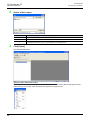
Writing to the BFM
2
1
Install
Uninstall
Start&Exit
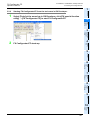
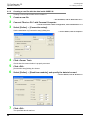
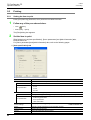
Writing [positioning parameters, servo parameters table information] to the 20SSC-H BFM.
Operate any of the following procedures
• Click
[Write to module].
• Select [Online] → [Write to module].
3
2
Window and
Operation
Config
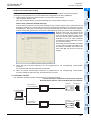
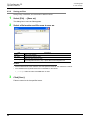
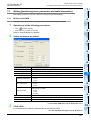
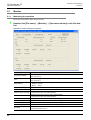
[Write to module] dialog box appears.
Select the data to be written.
4
Creating
Files
5
Data set
6
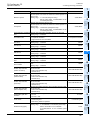
Description
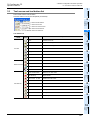
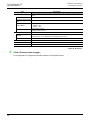
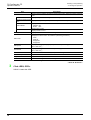
Displays [COM port] in [Connection setup] dialog box
Displays [Transmission speed] in [Connection setup] dialog box
Module No.
Displays [Module No.] in [Connection setup] dialog box
Item
Ticks off the data to be read
7
Data flow
And
Procedure
Transmission speed
Positioning parameters
Ticks off the axis of positioning parameters to be written
• X-axis
• Y-axis
Servo parameters
Ticks off the axis of servo parameters to be written
• X-axis
• Y-axis
Table information
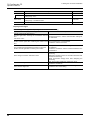
Sets the writing range after ticking off the axis of table information to be written
Setting range : 0 to 299
• X-axis
• Y-axis
• XY-axis
<OK>
Writes the selected data to the BFM
*1.
9
Print
Ticks off when writing the data selected in [Item] to Flash ROM
8
Debug
In the
Positioning
Flash ROM write*1
<Cancel>
Cancels selecting and closes the dialog box
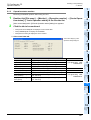
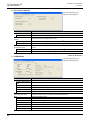
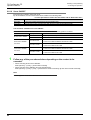
For the flash ROM write, refer to the following.
→ For the flash ROM write, refer to Subsection 7.3.2.
Click <OK>.
FX Configurator-FP writes the selected data to the 20SSC-H BFM.
→ For the displayed messages, refer to Section 7.6.
53
10
Edit
Function
In data
3
Setting
The
Connection
Item
COM port