1
Setting Up The iPod Playlists
00
01
02
03
04
05
06
Playlists
Avril Lavigne
Eric Clapton
Mariah Carey
John Michael Montgomery
Reba McEntire
Tim McGraw
Acker Bilk
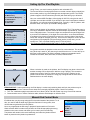
Using iTunes, you would create a playlist for each selectable CD.
>
>
>
>
>
>
>
Playlists
95 Aerosmith
96 ZZ Top
97 The Moody Blues
98 Rick Springfield
99 The Eagles
T19
>
>
>
>
>
>
On-The-Go
>
00 Avril Lavigne
Losing Grip
Complicated
Sk8er Boi
I’m With You
Mobile
Unwanted
Tomorrow
iPod
The first two letters of each playlist name must contain numeric digits to identify the
disc number position. Any text following these two digits are ignored. The CD100
jukebox supports 100 CD selections (00 to 99) with each having up to 99 tracks.
Here, we used an 8GB iPod Nano. After ripping all 100 CD's, using the bit rate of
192 kbps, we used about 6.3GB. If you decide to have more tracks than a standard
CD capacity, you will need a larger capacity iPod. Typically, a 100 CD jukebox, with
99 tracks each, can require up to 50GB of storage space.
Notice, near the bottom of the playlists, a playlist named "T19". This playlist name is
used as an initialization identifier. When the iPod Adapter is powered-up, it searches
for the T## playlist name. The numeric digits are compared to the stored digits from
a previous iPod initialization. If the digits are not the same, a new iPod Initialization
is performed. Any time the iPod will be re-sync'd, the numeric digits of the playlist
name T## should be changed (00 to 99). This forces the adapter to "learn" the new
configuration of iPod playlists (CD's) and songs (tracks). In this case, you can
rename it to "T20" or for date tracking, name it "T20 July 2012".
For iTunes to transfer this playlist name, it needs to contain at least one song
Song positions within the playlists are the same for track selections. The very first
song at the top is track 01, the next song is track 02 and so on. You can have up to
99 songs in each playlist. The iPod is capable of playing most standard audio
formats such as AAC, MP3, MP3 VBR, Lossless, WAV and AIFF.
When a selection is made on the jukebox, the iPod display may show a check mark
and the message "OK to disconnect" while the song is playing. This means the
jukebox has control of the iPod. When the end of the song is reached, or the
jukebox cancel button is pressed, the song play is stopped and the iPod screen
switches back to the menu display.
ERROR NOTICE: If, when powered up, the iPod display is continuously switching back and forth, the problem may be ...
♦ No playlists were found. Need to have at least one numerically identified playlist. Check iPod contents.
♦ The "Tnn" initialization playlist name was not found. Need T00 to T99 with at least one song. Check iPod contents.
♦ Communication error or failure. Defective cable, defective iPod Adapter or defective iPod.
Manual iPod Control Mode
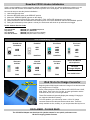
iPod Mode lets you play songs using the iPod controls instead of the jukebox. To do
this, you need to add the dollar sign ($) as the first letter of a song name, then
choose that song selection from the jukebox.
Here, we programmed the fifth song in playlist 00 as the switch to iPod mode.
When selection 0005 is made on the jukebox, the iPod will start playing that song,
switches to the menu screen and allows you to control your iPod manually.
The jukebox will remain in this mode indefinitely until either the jukebox Cancel
button is pressed or the jukebox is powered off.
00 Avril Lavigne
Losing Grip
Complicated
Sk8er Boi
I’m With You
$Mobile
Unwanted
Tomorrow