1
iPod Adapter Installation
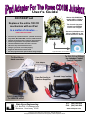
Easy jukebox installation ! Only three connectors, two RCA audio connectors to your amplifier and the 3-pin
communication connector to your jukebox Central Control Computer. Any jukebox that uses the 408322xx Central Control
Computer can be adapted to an iPod player except for models CD100I and CD100J. These two models require an
external mute control which is not supported by the iPod adapter.
The iPod adapter connects directly to your jukebox CCC and mimics the mechanism control and CD decoder operations.
This tricks the jukebox into thinking it is still hooked up to a CD player and allows the jukebox to select individual songs
from the iPod, same as if it were playing CD's.
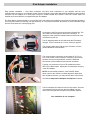
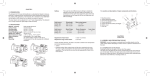
Connection to the iPod is through the 30-pin Docking Port. The
iPod cable has locking tabs to secure the connection. To
unplug the cable, press the release buttons at each side of the
connector then pull out.
The AC adapter powers the unit and keeps the iPod battery
charged. The DC connector is a 2.1mm, center pin positive.
The orange & white wires with the 3-pin connector is for the
jukebox Rowelink communication.
The communication connectors are at positions P10, P11 or
P12 on the central control computer. Commonly, two of these
positions are used, and sometimes, all three if additional
accessories such as wallboxes and remotes are added.
Typically, one connector is for the CD mechanism and the
other for the Bill Acceptor. Unplug the CD mechanism and plug
in the iPod adapter.
NOTE: On later model jukeboxes, if the CANCEL button
doesn’t work or the volume level starts high then drops down
after a jukebox selection, you may need to add or move a wire.
Visit website http://www.cdadapter.com/faq.htm for details.
The iPod Adapter kit includes a Ground Loop Isolator. One end
is connected to the line-out from the iPod adapter unit, the
other end to the right and left inputs of the jukebox amplifier.
Your installation is now complete !