1
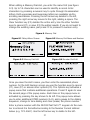
When editing a Memory Dial slot, you enter the name first (see figure
9.3). Up to 16 characters can be used to identify a record. Enter
characters by pressing a numeric key to cycle through its associated
letters. Both uppercase and lowercase letters are available via the
scrolling mechanism. Pressing the left arrow key deletes to the left,
pressing the right arrow key moves to the right, adding a space. The
Clear function key (F2) deletes the entire entry. Use the other function
keys to cancel (F1) or save (F3) the edited results. If you do not want to
change the existing name, just press F3 to proceed to number entry.
Figure 9. Memory Dial
Figure 9.1 Setup Menu Screen
Figure 9.2 Memory Dial Name and Number
Figure 9.3 Memory Dial Edit
Figure 9.4 Number Dial Edit
Once you save the slot’s name, you then enter the associated phone
number. On the Edit Number screen you use the function keys to cancel
(F1), save (F2) or access other options (F3). The Options key activates a
popup menu that contains additional operations. Press F3 again to view
the second page of the popup menu. Each item on the popup menu is
activated by pressing the key shown to its left. The popup menu allows
you to enter additional DTMF numbers (A-D), add a pause to the dialing
sequence, change to tone dialing and clear (erase) the phone number.
Enter a phone number with the RECON Test Set’s™ keypad. As the number is entered it is formatted according to the Number Format defined
below (e.g. 123-4567). Use the left arrow key to delete to the left..
21