1
Table of Contents
About this Manual..................................................................................... 3
Introduction......................................................................................... 3
Symbols and Icons............................................................................... 3
Terms and Descriptions........................................................................ 4
Safety Information................................................................................ 5
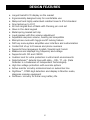
Design Features........................................................................................ 6
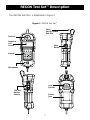
RECON™ Test Set Description.................................................................... 7
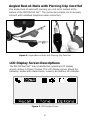
Angled Bed-of-Nails with piercing cord set............................................ 8
LCD Display Screen.............................................................................. 8
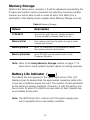
Memory Storage................................................................................ 10
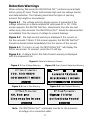
Detection Warnings............................................................................ 11
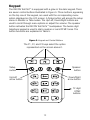
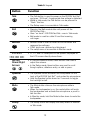
Keypad.............................................................................................. 12
Operations.............................................................................................. 14
Turning the Unit On/Off....................................................................... 14
Automatic Power Down...................................................................... 14
POTS General Guidelines.................................................................... 15
Operation Notes................................................................................. 15
Talk/Bell/Monitor................................................................................ 15
Talk Setting (Talk Mode)...................................................................... 16
Off-Hook Protection (Data Defender™)........................................... 16
Call Waiting/Caller ID.................................................................... 17
Speed Dial................................................................................... 17
Flash........................................................................................... 17
Mute Button........................................................................................... 18
Bell Setting (Bell Mode)........................................................................... 18
Monitor Setting (Monitor Mode)................................................................ 19
Setup Menu............................................................................................ 20
Memory Dial...................................................................................... 20
Recent Call List.................................................................................. 22
Language.......................................................................................... 22
Number Format.................................................................................. 22
Ring Volume...................................................................................... 22
Display Contrast................................................................................. 22
Backlight level.................................................................................... 22
Auto Power Off................................................................................... 22
Maintenance ......................................................................................... 23
Battery Replacement.......................................................................... 23
Cleaning............................................................................................ 23
Storage............................................................................................. 24
Customer Service.................................................................................... 24
Contacting Platinum Tools................................................................... 24
Additional Accessories . ..................................................................... 24
Warranty Information.......................................................................... 25
Registration....................................................................................... 25
Disposal............................................................................................ 25
Returns............................................................................................. 25
Specifications......................................................................................... 26
2