1
®
H04 / SCAMAX 510
Table of Contents
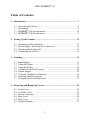
1. Introduction ........................................................................................... 7
1.1
1.2
1.3
1.3
General Safety Notice....................................................................... 8
Description....................................................................................... 9
®
SCAMAX 510 Specifications ....................................................... 10
SCAMAX® 510 Specifications ....................................................... 11
2. Setting Up the Scanner ........................................................................ 13
2.1
2.2
2.3
2.4
Placement and Environment ........................................................... 13
Power Supply / Switching the Scanner on ....................................... 14
Switching the Scanner off............................................................... 15
Connecting the Scan PC ................................................................. 15
3. Scanning............................................................................................... 16
3.1
3.2
3.2
3.3
3.4
3.5
3.6
3.7
Input Hopper .................................................................................. 17
Using the Feeder ............................................................................ 17
Using the Feeder ............................................................................ 18
Variable Feeder Belt Pressure......................................................... 19
Output Hopper ............................................................................... 20
Ultrasonic Double Feed Detector .................................................... 21
Scanning Small Documents ............................................................ 22
Changing the Scan Background ...................................................... 23
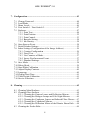
4. Removing and Replacing Covers......................................................... 24
4.1
4.2
4.3
4.4
4.4
4.5
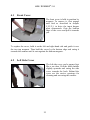
Front Cover .................................................................................... 25
Left Side Cover .............................................................................. 25
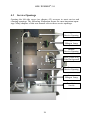
Service Openings ........................................................................... 26
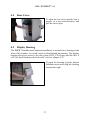
Rear Cover ..................................................................................... 26
Rear Cover ..................................................................................... 27
Display Housing............................................................................. 27
2