1
About Forms
Before we get started and begin defining a form, we will have a look
at a few things about forms in general, as well as what happens
when a user completes a form and hits the Submit button, so that
you can understand the concepts involved.
A form consists of questions, grouped into sections. For example,
you may have a section titled “Personal Details”, which has the
questions: “Name”, “Address” and “Date of Birth”. The questions for
your form are defined on the Form tab.
You can have your questions appear on the page sequentially in the
order of the sections, or you can define a complex format using
tables to define the layout and background colour. This is done on
the Format tab.
You can apply rules to the form, to ensure users fill out important
fields. The form doesn’t get submitted until it is completed.
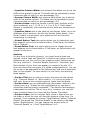
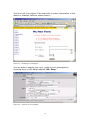
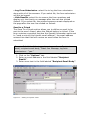
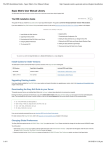
After the user has answered the questions on your form, MySource
does several things with the results. The diagram below shows what
happens after a user has clicked the Submit button on your form:
As shown in the diagram above, when the user clicks the Submit
button, the following happens:
•
•
•
•
The form page is updated with a Thank You Message
The user receives a Receipt Email
A member (or members) of your staff receive Recipient Email
The submission can be logged to the MySource database
2