1
Agresso User Manual –Purchasing Officer
2.3 Configuring the Purchase Invoicing/Journals Entry Set up
Before entering Purchase invoices or Journal Entries, the set up must be configured. This will
only need to be done once. If there is a change of PC you may be required to configure your
settings again.
To configure set up:
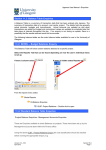
1. Access the ‘Posting Purchase Invoices’ screen by clicking on:
Agresso Financials
General Ledger
Transaction entry
Posting
2. The following screen (VP10) will appear:
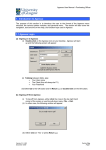
3. Click on ‘File’ then ‘View Options’.
4. The following screen will appear.
Version 4.0 –553
May 2010
Section Two
Page 3