1
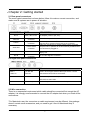
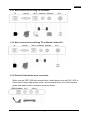
English Chapter 2: Getting started 2.1 Rear panel connectors The most typical connection is shown below; follow it to make a correct connection, and make sure all systems are in power off situation. CONNECTOR DC In VGA Out VGA In TYPE 5mm, INT+, EXT15 pin D-Sub connector 8 pin Mini DIN connector Audio Out 3.5mm stereo connector Video Out RCA Jack RF IN TV antenna connector DESCRIPTION AC adapter, power in (5V, 2 A)。 Main video output. Connect to CRT/LCD Monitor。 VGA-In loop back cable: The other end of this cable connects to PC system VGA D-sub 15 pin connector. Audio out: Connect to PC sound system (Line-in of sound card) the built-in speaker will be automatically disabled when this connector is plugged in。 Video output. Can be used to connect to Video input of display unit. TV or CATV signal in connector。 2.2 Right Side panel connectors CONNECTOR TYPE DESCRIPTION YPbPr / 7 pin Min Din YPbPr / S-VHS type external video input source. can be S-Video In connector connected to DVD,VCR or Camcorder.。 Video In RCA JACK External composite video input source, can be connected to DVD,VCR or Camcorder.。 Audio In RCA audio jack RCA audio jack used for external audio input source. 2.3 Wire connection There is no sequential requirement which cable should be connected first except the AC adapter, it is strongly recommended to connect the AC adapter last when you finish all the connections. *For Macintosh user, the connectors or cable requirement may be different, this package doesn’t contain such accessories, and you need to get it from a Macintosh shop if necessary. 2