1
Upgrading from Accumulo 1.4
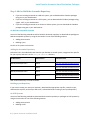
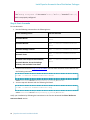
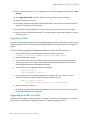
5. You will be prompted to restart the cluster. Because the Accumulo parcel was not previously in
use, you can safely skip this step and click Close.
Now continue with the instructions in Step 3: Configure HDFS. Install Apache Accumulo using Cloudera
Manager.
Upgrading from Accumulo 1.4
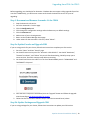
If you have a cluster currently running Cloudera’s packaging for Accumulo 1.4 on CDH 4, the following
instructions will guide you through upgrading to Cloudera’s packaging for Accumulo 1.6 on CDH 4. You
should plan for down time; the Accumulo service must be stopped as a part of the upgrade.
Upgrading with Cloudera Manager
1. Upgrade your Cloudera Manager to 5.1.0 or later, using the instructions for updating to the
latest Cloudera Manager version.
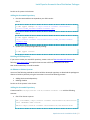
2. Follow the instructions in Step 1: Add the Remote Parcel Repository for Accumulo 1.6.0-cdh4.6.0
in the section on Configuring Cloudera Manager for Accumulo 1.6 on CDH 4.
3. Stop Accumulo 1.4 service in Cloudera Manager.
4. Take note of your configuration settings. In particular, you will need the Accumulo Instance
Secret, Accumulo Instance Name, Logger WAL Directories, and the maximum heap sizes for both
the Tablet Server and Logger roles.
5. Install the parcel for Accumulo 1.6.0-cdh4.6.0 according to Step 3: Install the Accumulo Parcel in
the section on Configuring Cloudera Manager for Accumulo 1.6 on CDH 4.
6. Add Accumulo 1.6 service to your cluster.
7. In the role assignments page, you should have the same deployment as you had with 1.4.
Specifically, the tablet servers should match exactly what they were in Accumulo 1.4.
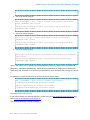
8. In the "Review Changes" page in the wizard, set the properties to have the same values that
they were in Accumulo 1.4. The Accumulo Instance Secret and Accumulo Instance Name must
match exactly what they were in Accumulo 1.4.
9. The wizard will try to initialize Accumulo and fail. This is expected, because you already have an
Accumulo instance defined. Cancel the wizard.
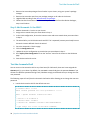
10. Browse to the Accumulo 1.6 service page.
11. Click on Configuration tab.
12. Search for “logger”.
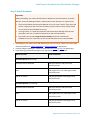
13. Click the entry for Logger WAL Directories and enter the same value that it was in Accumulo 1.4.
14. Search for “tserver_max”.
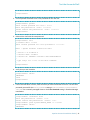
15. Click the value for Tablet Server Max Heapsize. Make sure it is set to the sum of the Accumulo
1.4 Tablet Server and Logger maximum heap sizes.
Apache Accumulo Installation Guide | 17