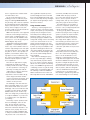
1
DESIGN /
ments, and they can also customize the
database engine to provide better system performance for content management functions. OutStart Evolution®,
Aspen®, and learn eXact® are all examples of blended XML systems.
Once you have an XML repository, your
repository can inter-operate with other
systems, such as LMSs or even LCMSs,
but the content is organized for your
exclusive needs and convenience. If your
needs or tools change, so can the repository. You have created for yourself an
“Open Source” solution. For that reason,
the XML repository is simpler and less
difficult to upgrade than many proprietary solutions.
XML and SGML were developed specifically to provide a structure and methodology for content reuse. Many of the lessons learned from early SGML implementations were built into XML, which provides a more streamlined and less labor-
intensive means of achieving high quality
content reuse.
Question: If XML repositories are so
great, then why doesn’t anyone market
an XML repository as an LCMS?
Answer: Practically all LCMS vendors
are organized according to a service consulting business model. They invest massive amounts of time and money to create efficient systems, which they practically give away for free. They do this so
that they can sell you customizations,
service, training, maintenance, and support. A pure XML repository system
could be serviced and maintained by a
wide variety of vendors, so they might
never earn back the investment they
made in creating the solution.
The proprietary product offer does tie
the business to the vendor, but it also
ties the vendor to the business because
the vendor has a huge stake in the outcome of the LCMS implementation.
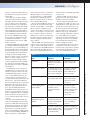
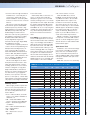
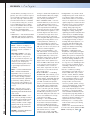
TABLE 1 Objectives and Limitations in the steps to a XML repository system
Step
Objectives
Limitations
File Server
To permit access and
sharing of files between
many users.
Slow, insecure, and
does not scale well.
Version Control System
To maintain different versions of the same document so that the newest
(best) can be identified.
Complex to maintain
and difficult to use
when additional features are added.
Document Manager
To automate more complex features (and rules).
Proprietary — software
does not keep pace
with new tools and
processes.
Learning Management
System (LMS)
To improve the efficiency
of training content
delivery and progress
tracking.
Can limit designers
in terms of format or
delivery methods, may
not accommodate
editing and version
control well.
Learning Content
Management System
(LCMS)
To improve the efficiency
of training development
through content management and reuse.
Often includes a poor
user interface; extensive customization
required.
XML Repository
To provide content reuse,
multiple output formats,
and extensibility to react
to changing needs.
Requires rethinking of
the development model
by designers.
THE ELEARNING DEVELOPERS’ JOURNAL / FEBRUARY 2, 2004
3
numbers of people put large numbers of
documents into the system, it became
harder again.
Then came the document management system which made it simpler to
find things, but which usually locked you
into tools and processes that rapidly
became outmoded. A good example of
this last hurdle to progress was a large
legal firm that implemented a complex
macro-language-driven documentation
system that interoperated with their document management system. When the
next version of MS-Word arrived, they
were very upset to find that there was
no backward compatibility — so they
remained with the older version of MSWord for ten years.
Learning management systems (LMSs)
are primarily student-facing applications.
Their purpose is to present training to a
student population and to track student
performance. Over time, more and more
content management facets have been
sneaking into these learning delivery
platforms. That is not their core function,
which is to deliver existing content to
students efficiently. Although learning
content management systems (LCMSs)
are designed to efficiently manage content, they suffer from a lack of flexibility
and timeliness.
Everything that is true of document
management tools locking you into particular tools and processes is also true
of LMS/LCMS deployments, only much
more so. Most LCMSs have their own
content creation tools, which may be
very well intentioned, but which also may
fall very short of the functionality and
finesse represented by other commercial
applications. Of course, most will work
with major content generators (more or
less), such as MS-Word and Adobe
FrameMaker, but they increase the complication of version upgrades by several
orders of magnitude. This is a significant
expense that must be factored into the
cost of ownership and operation of these
systems.
The best of the available LCMS systems are blended XML solutions. These
systems use XML/XSLT technology as a
transformation mechanism, but retain a
proprietary data architecture for database functions. In this way, they have
many of the advantages of XML technology, such as interoperability, SCORM-compliance, and access to XML enhance-
strategies