1
DESIGN /
Publisher David Holcombe
Editorial Director Heidi Fisk
Editor Bill Brandon
Copy Editor Charles Holcombe
Design Director Nancy Marland
The eLearning Guild™ Advisory Board
Ruth Clark, Conrad Gottfredson, John Hartnett,
Bill Horton, Kevin Moore, Eric Parks, Brenda Pfaus
Marc Rosenberg, Allison Rossett
Copyright 2004. The eLearning Developers’ Journal™.
Compilation copyright by The eLearning Guild 2004. All
rights reserved. Please contact The eLearning Guild for
reprint permission.
The eLearning Developers’ Journal is published weekly
by The eLearning Guild, 525 College Avenue, Suite
215, Santa Rosa, CA 95404. Phone: 707.566.8990.
The eLearning Guild is an operating unit of Focuszone
Media, Inc., 1030 Beatrice Street, Eagan, MN 55121.
2
FEBRUARY 2, 2004 / THE ELEARNING DEVELOPERS’ JOURNAL
The Journal is included as part of Guild membership.
To join the Guild go to www.eLearningGuild.com.
The eLearning Developers’ Journal™ is designed to serve the industry as a catalyst for innovation and as a vehicle for the dissemination of
new and practical strategies and techniques for
e-Learning designers, developers and managers. The Journal is not intended to be the
definitive authority. Rather, it is intended
to be a medium through which e-Learning practitioners can share their knowledge, expertise
and experience with others for the general
betterment of the industry.
As in any profession, there are many different perspectives about the best strategies,
techniques and tools one can employ to accomplish a specific objective. This Journal will share
these different perspectives and does not position any one as “the right way,” but rather we
position each article as “one of the right ways”
for accomplishing a goal. We assume that
readers will evaluate the merits of each article
and use the ideas they contain in a manner
appropriate for their specific situation. We
encourage discussion and debate about articles
and provide an Online Discussion board for
each article.
The articles contained in the Journal are all
written by people who are actively engaged in
this profession at one level or another — not
by paid journalists or writers. Submissions are
always welcome at any time, as are suggestions for articles and future topics. To learn
more about how to submit articles and/or
ideas, please refer to the directions in the box
on page 5 or visit www.eLearningGuild.com.
strategies
way in which each object is understood,
used and maintained. In evaluating how
to construct learning object models for
an XML repository, it is very important to
understand that these models are used
to define queries. The value of the system depends upon the ease and accuracy of queries. Many organizations discovered too late that they had expended
substantial resources in creating an XML
(or SGML) repository that provided no
additional benefit over cutting and pasting documents from a file server because their content authors could not
find anything in the repository.
Repository design
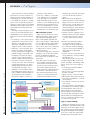
A content repository has several different purposes:
• To store controlled versions of documents
• To store current versions of learning
objects
• To store in-work versions of learning
objects
• To publish content to Web servers
• To publish content to other servers
(Learning Management Systems,
abbreviated as LMS)
• To function as an ISO Repository
The most important reason for having
a repository is to facilitate collaboration
between content creators, editors and
production staff. One mistake often
made with a complex repository is to
make customized views that are not
shared between different team members. This can be frustrating and timeconsuming.
Once everyone has gone through the
arduous task of chunking and labeling
their legacy content, this content needs
to be put into a repository where it can
be easily accessed. The best way to do
this, for instructional designers, is to put
the content into a version control system
that is linked to a database.
ClearCase, for example, is a version
control application that can present several different views of the repository for
different uses. One view presents a virtual file server that contains all the most
recent versions of the training documents. Another view presents selected
documents to a Web server or LMS. Yet
another view presents the XML database
elements. Other views can be developed
for specific uses, such as creating
archives of content, presenting catalogs
of approved artwork or source content
for other servers such as Adobe
Document Server or FrameMaker Server.
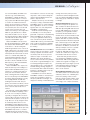
The road to XML content reuse is simply a progression of responses faced by
learning organizations. Generally speaking, there are six steps taken on the path
from no content sharing and reuse to a
comprehensive XML repository system:
1. File Server — A “shared drive” accessible to all team members with read
and write permissions to all.
2. Version Control System — A collection
of documents, stored by document version to protect against accidentally
overwriting files.
3. Document Manager — A software system that provides different levels of
access to documents based upon
selectable criteria.
4. Learning Management System (LMS)
— A system that provides access to
learning content for students, authors,
and editors. The modern LMS usually
provides some kind of virtual campus
paradigm.
5. Learning Content Management
System (LCMS) — A system that
divides up learning content into manageable components, which can be
dynamically revised in some or all of
its instances in the curriculum.
6. XML Repository — A system that
applies content taxonomies to organize content into associative and structural classifications so that content
can be created and managed with
maximum efficiency.
Not every organization progresses
through each step in an orderly manner.
It is often the case that different groups
within a learning organization implement
different steps at different times, and
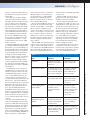
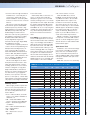
then face significant challenges integrating the results. Table 1 on page 3 summarizes some of the objectives and limitations of each step in the progression.
When computer networks became
common in the workplace, people abandoned the file cabinet for the file server.
They soon learned that file servers have
their own defects when it comes to sharing important information. The next logical step was to try to remove the most
glaring defects of the file server by implementing a version control system. The
version control systems made it safer to
put your documents onto the network
and easier to find things, but when large