1
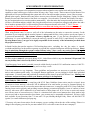
TABLE OF CONTENTS
SC811 Remote User Information
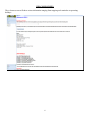
Remote Access
Welcome Screen
Notice View & Tool Bar
Filling out the Locate Notice
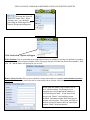
Caller/Company/Site Contacts
Done By/Duration/Drill/Bore/Explosives/RR
Custom Field (Subd/Done For)
Work Site Location
Notice Type Field
Notice Types:
• Normal
• Design
• Subaqueous & Actions
Work Type and Work Date & Time Field
State/County/Place Fields
Address & Intersection Fields
Directions & Instructions Fields
SC811 Location Entry Guidelines
Other Locate Notice Examples & Guidelines
• Single/Multiple Addresses
• Point Address
• No Specific Address
• Apartment/Mobile Home Parks
• Unknown Roads/Alleys/RR
• Unknown Easement/Right of Ways
• Lat & Long
• Intersection Notices
• County Lines
• Working along a Road
• Footage Segments
Remarks Field & Example of completed notice
Mapping Tool Bar
Map Legend
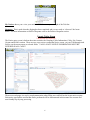
Locating the Dig Site
Map Search Tool
Mapping the Dig Site & Site markers
• Draw Point
• Draw Line
• Draw Polygon
Members Section
Adding Members
Disclaimers/Notice Number
Update & Expiration Dates
2
3
4
5-6
Replicate & Secondary Action 45
Cancel
46
No Show
47
Resend
48
Remark
49
Update (on time) & Late
50
360 Positive Response & Codes 51-54
Notice & Action Overview
55
7-8
9
10
10
11
12
13
14
14
15-16
16
17-20
21-30
21-23
21
23
24
24
25
26
27
28
29
30
31
32-33
33-34
35-36
37
38
38
39
40
41
42
43
44
1