1
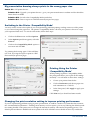
dling this level of resolution. However if you are experiencing problems, you may wish to try changing the Print DPI setting and/or adjust the Buffer Size. Follow these steps to change the default print resolution (DPI) and the buffer size: 1. Click on the View menu and then Options 2. In the Options panel that appears, select the Print tab 3. First try to use the Autodetect option—if your system requirements are low the Print DPI should change from the default of 200 to a lower number and the Buffer Size may change as well (the default Buffer Size is 256 4. You can also use your mouse to move the slider buttons to the left to reduce the print DPI or buffer size 5. Try printing again. You may have to reduce the DPI further to print with your system Figure 32—Changing print quality Note: Changing the Buffer Size can effect the quality of the output, mostly with larger sheet sizes and scales. Once your system reaches your Buffer Size setting it will reduce print quality in order to continue the printing process. You may need to test printing with different settings to get the best results and performance. About Reducing Resolution (DPI) If reducing DPI or Buffer Size does not a solve your printing issues or if the reduced quality does not meet your standards, upgrade your system to meet or exceed the minimum requirements. Recommended Printers and Paper Choosing the Best Paper for Printing Standard bond papers can be used for printing in color, however using coated papers will produce the best results. If you are using bond paper, a heavier weight is recommended (24‐28lb papers are ideal). It is not necessary to use glossy papers as they are expensive, give off too much glare and take a long time to dry. Recommended Printers Printing large (Arch C & D) colored drawings requires a printer with a sufficient amount of memory. The following is a recommended large format printer that will work well with DS|Color: Canon imagePROGRAF iPF610—this is 24‐inch large format printer is the fastest out there and can handle large print jobs. This printer is new on the market and uses brand new technology. This is your best option for printing from DS|Color. Canon also has 36‐inch models available (iPF 710). 26 DynaSCAPE Software