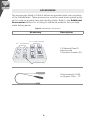
1
Testing Data Cables
Testing a data cable is a 2-end test where one end is connected to the
main tester and the other end is connected to the remote tester.
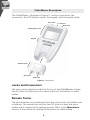
1. Plug one end of the data cable into the RJ45 jack on the main tester.
!
Visually inspect the tester to make sure you are inserting the
cable into the appropriate jack.
2. Insert the opposite end of the cable into the RJ45 jack on the remote
tester.
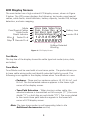
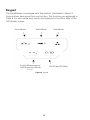
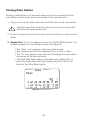
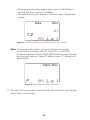
3. Single Test. To run a single test, press the DATA MODE button. The
following appears in the display screen (see Figure 8):
▪▪The “Data” icon appears at the top of the screen.
▪▪The cable wiring structure displays (Pass, X-over, or Rev).
▪▪The “ID” icon appears with remote #1 displayed as the cable is
connected to the remote tester.
▪▪The Wire Map fields update to indicate any cable faults. A
perfectly wired data cable will display all pins (1-8) in both
fields of the Wire Map display.
Voice Data Video Tone
Pass X-over Rev
Fail Short Split Open
Shielded Voltage! ID
10
9
12 3 4 5 6 7 8
1
8
Figure 8. Data Mode Test
21