1
CableMaster 450
Voice, Data & Video Tester with Length Measurement
User Manual
Table of Contents
About this Manual...................................................................3
Symbols and Icons..............................................................3
Terms and Descriptions......................................................4
Safety Information..............................................................5
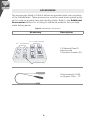
Accessories......................................................................6
Design Features.......................................................................7
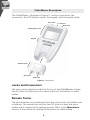
CableMaster Description...................................................8
Jacks and Connectors.........................................................8
Remote Tester...................................................................8
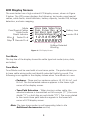
LCD Display Screen..........................................................9
Keypad.......................................................................13
Operations.....................................................................16
Turning the Unit On/Off...................................................16
Automatic Power Down...................................................16
Cable Testing General Guidelines....................................17
Testing Voice Cables.........................................................18
Testing Video Cables.........................................................20
Testing Data Cables.........................................................21
Using ID Mode..................................................................22
Using Tone Mode.............................................................24
Using Length Mode..........................................................26
Maintenance. ................................................................33
Battery Replacement........................................................33
Cleaning.......................................................................33
Storage....................................................................33
Customer Service...................................................................34
Contacting Psiber Data..................................................34
Additional Accessories.....................................................34
Warranty Information.......................................................35
Registration...............................................................35
Disposal......................................................................35
Returns........................................................................35
Specifications....................................................................36
Appendix: Cable Wiring and Display Screen.........................38
2