1
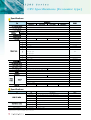
Communication specifications
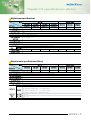
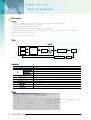
Specifications
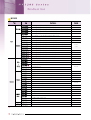
Item
Specifications
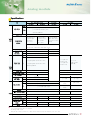
It is LGIS dedicated protocol for easy communication with LG products.
(Supports high-speed link)
It supports Modbus, Modicon PLC’s communication protocol.
(It supports ASCII mode and RTU mode)
Dedicated
Modbus
Built-in
(Ch0,
Ch1)
User- defined
User-defined protocol allows users to communicate with other devices.
No protocol communication is useful when communication between
K120S and other devices which do not have protocol
(It communicates with other devices by frames which are set by total size of communication
bytes or user-defined code).
RS-232C: Communication using a modem
RS-422/485: Support all the built-in functions
No protocol
Cnet
Communi
-cation
module
(Ch0)
Remarks
Fnet
LGIS dedicated network between LGIS PLCs for high speed link
Rnet
LGIS dedicated network with SMART I/Os
Dnet
DeviceNet interface (slave)
Pnet
Profibus-DP interface (slave)
※ Please refer to
K120S user’s
manual regarding
LG protocol.
In case of using the
built-in
communication Ch
No.0 (4, 5, 7),
a communication
module is not
available and
vice versa.
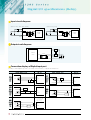
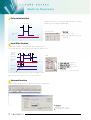
- KGLWIN connection
- HMI connection
Loader
port
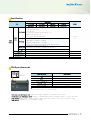
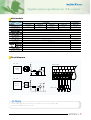
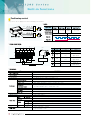
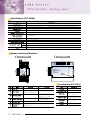
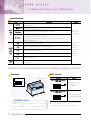
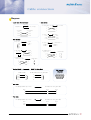
Built-in/Communication module setting switch
Built-in Cnet
Structure
Terminal block cover
Bult-in Cnet
ON
OFF
Dip switch
Built-in/Communication module
setting switch
Switch
ROM Mode
PW RO
RU NO
ER RO
ON
OFF
Contents
Set for using built-in RS-232C
(Using pin No. 4. 7. 5 of
loader port)
ROM Mode
Built-in/Communication module
setting switch
Switch
ON
OFF
Can’t use the built-in RS-232C
(Set for communication module)
ROM Mode
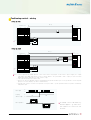
※ ROM mode function
ROM mode on: when power on, the program saved in the flash memory
operates
ROM mode off: when power on, it starts to drive a program saved in RAM
26
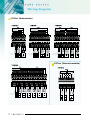
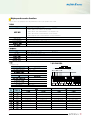
※ Ch0: No. 4, 5, 7 of 9 Pin (communication module is not available in
case of using the built-in Ch0 of Cnet)
Ch1: RS-485 (communication module available simultaneously)