1
Paying for an Order
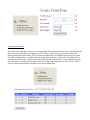
Orders need to be paid in advance before they can be put into production. Once an order is created, the
customer can pay for it by clicking on the Manage Orders link, and selecting on the Pay Now button for
the Order that he wants to pay. After the button is clicked, the order is marked as Paid, and it can no
longer be edited (notice that the edit button is grayed out). Then the order is available to be added to a
Print Run.
Modifying an Order
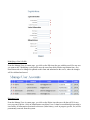
Sometimes a user may wish to modify an order before paying for it. The User can click on the Manage
Orders link on the Menu to get to the Order List page. Then the user can click on the Edit button (the
one with the pencil). Only orders that have not been paid for can be edited. A form with the pre-filled
order details will show up, then the user can edit it and resubmit.