1
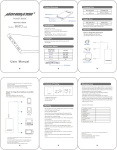
iC Lite Battery Changing
iC Pro/Classic Charging
iC Lite powered by a CR2032 button battery.
Gently plug micro-USB end of the cable into iC
Pro/Classic's micro-USB port, plug USB end to
USB 2.0 port on your computer.
1. Gently counter clockwise rotate battery
cover joint out
2. Mount one CR2032 button battery, positive
upward
3. Gently clockwise rotate battery cover joint in
Battery type is CR2032, ensure that the positive
upward
Remove battery when device is not used for a long
time
Non-rechargeable battery
Please only use the attached micro-USB cable for
charging
Please make sure your computer is on and not in
sleep or standby mode
Charge iC Pro/Classic for 4 hours before using it the
first time
Charge iC Pro/Classic fully before long-term storage
If iC Pro/Classic battery is empty for an extended
period of time, charge it for 4 hours prior to use