1
BIOS Setup Information
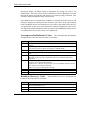
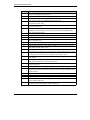
Auto (default setting) ! cannot set serial I/O resources by manual operation
Disabled ! indicates on-board COM port function is ineffective
3F8h/COM1 ! assign I/O address 3F8h to COM1
2F8h/COM2 ! assign I/O address 2F8h to COM2
3E8h/COM3 ! assign I/O address 3E8h to COM3
2E8h/COM4 ! assign I/O address 2E8h to COM4
On Board IR Port
This option control the resource assignments of on-board serial port 3. The IR
Mode Select has three settings IrDA, ASK IR, and FIR. The default setting is
Disabled.
On Board Parallel Port
There are four optional items Parallel Port Mode, EPP Version, Parallel Port
IRQ, and Parallel Port DMA Channel used to control on-board parallel port
interface while user select I/O base address manually. The following lists are
available options of on-board parallel port :
Auto (default setting) ! user can not control all of LPT port I/O resources
Disabled ! on-board parallel port function is ineffective and N/A
378h
! locate IRQ7 for this default I/O address
278h
! assign this I/O address to LPT1
3BCh ! assign this I/O address to LPT1
◎ Parallel Port Mode :
This option specifies the parallel port mode. ECP and EPP are both bidirectional
data transfer schemes that adhere to the IEEE P1284 specifications. This
Parallel Port Mode includes four options “Normal”, “Bi-Dir”, “EPP”, and
“ECP”. The optimal default setting is Bi-Dir.
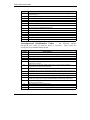
Setting
Description
Normal Uni-direction operation at normal speed
Bi-Dir Bi-direction operation at normal speed
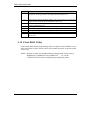
EPP
The parallel port can be used with devices that adhere to the
Enhanced Parallel Port (EPP) specification. EPP uses the
existing parallel port signals to provide asymmetric bidirectional
data transfer driven by the host device.
ROBO-618 User’s Manual
4-14