1
User name and Password
+;
Have you forgotten your CDA user name and paswoxd? If you have, use the in$u btts bel0s.v to
*send us your last name and email address, and a&&'rfoiward this info,rm~ti&;D~QU.
7, ..A
8
Contact Cathy Hafer at
Extension 3 149 or
Main Menu
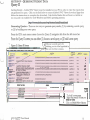
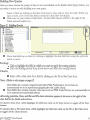
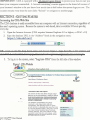
After logging in, you will be at your district's CDA Main Menu screen. The left menu bar contains
nallgation links for Querying Data, Quick Reports, Editing Tables, Changing Passwords, User
Administration, PSSA (AYP) Repon, Student Ledger, Uploading/Importing Data, and Workshop
Videos. To log off the system, click on Log Off located at the top of the screen in the green menu
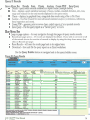
bar. The center of the screen displays the current login information including the user name and
organization, and all the access capabilities of that user. The 'Last Import' column to the right of
the table list denotes the date when data was last imported to the database, and the 'Records' column
indicates the number of records that populated the table on the date of last import.
,7?>;k.L' ;'8.:
A<<r,,,.Gz.,:..:
Figure 5. Menu Screen
..
.
--
--~
- .. .-
~ 1 ~ ~ 0 ~ 0 3 0 4
CDA
Naxigation
Links
Change Your ~assbkrd
..
.
User Adminktratlon
PS~A
Report
.
.
A N CDAQ2002User Manual
Revised: 7/2006
MATHOP0405
PSATO304
PSSA0304
PSSA0405
.--.
--
-