1
Changing User Passwords
Passwords should be changed on a regular basis to prevent security breaches and to ensure d
protection and accuracy.
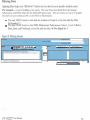
1. Log onto the system using your current password.
2. Choose Change Your Password link from the left menu bar.
3. Enter current password in the first field.
4. Enter the new password in the second fieid.
5. Confirm the new password by retyping it in the third field.
6 . Click on the Submit button.
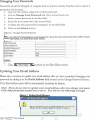
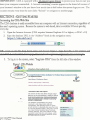
Figure 6. Change Password Scxeen
nter your old (current) password, a new password, repeat the new password in the Confwm Passwo
Last Name, and Email then press Submit
7. Click )I Main Mentr
to return to the Main Menu screen.
Updating Your Email Address
Please take a moment to update your email address after you have completed changing your
password by adding it to the Email Address field located on the Change Password Screen.
Your first and last name will be automatically furnished by default.
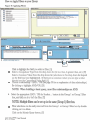
Note: Ifyou do not elect to update your emaifaddress, &er you change yourpasswc
CDA wiUpe~~wlicaffyremindyou
to do so. You wiLl see the followkg message.
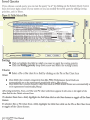
Firmre 7- IJndate Rmail
LA-.,:
Mensage
,oft Internet Explorer
I
Please llse the Change Pasward firnction Ln enter it.
AIU CDAQ2002User Manual
Rpoicrrl. 7/700(1
C