1
Renoise 3 User Manual
Table of Contents
1 Welcome to the Renoise User Manual.......................................................1
2 Main Screen............................................................................................2
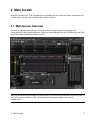
2.1 Main Screen Overview.....................................................................................2
2.1.1 Upper Status Bar.....................................................................................3
2.1.2 Global Song Control................................................................................3
2.1.3 Song Visualisation...................................................................................3
2.1.4 Loading & Saving Files............................................................................3
2.1.5 Selecting Instruments.............................................................................4
2.1.6 Creating & Editing Instruments...............................................................4
2.1.7 GUI presets.............................................................................................5
2.1.8 Sequencing Patterns...............................................................................5
2.1.9 Creating Patterns....................................................................................5
2.1.10 Applying Effects....................................................................................6
2.1.11 Lower Status Bar...................................................................................6
2.2 Guide Yourself Through the Interface: Tooltips...............................................7
2.3 Renoise Work-flow: Learning the Keys............................................................7
3 Setting Up Audio Devices.........................................................................8
3.1 Default Setup..................................................................................................8
3.2 Audio Preferences...........................................................................................8
3.3 Audio Setup on Windows.................................................................................9
3.4 Audio Setup on Mac OSX...............................................................................10
3.5 Audio Setup on Linux....................................................................................10
3.6 Latency & Sample Rates...............................................................................11
4 Setting Up MIDI Devices.........................................................................12
4.1 Default Setup................................................................................................12
4.2 Monitoring MIDI-IO........................................................................................12
4.3 MIDI Preferences...........................................................................................13
4.4 Device Setup.................................................................................................13
5 Disk Browser.........................................................................................15
5.1 Load & Saving Files.......................................................................................15
5.2 File Types Selector........................................................................................15
5.2.1 Supported Formats For Song Importing................................................16
5.2.2 Supported Formats For Sample Importing............................................16
5.3 Folder Panel..................................................................................................16
5.4 File Panel.......................................................................................................17
5.5 Resizing The Interface...................................................................................19
5.6 Loading Multiple Entries at Once...................................................................19
5.7 Navigating the Disk Browser with the Keyboard...........................................19
5.8 Importing Raw Audio Files (Convert Any File to Audio Sample)....................20
6 Transport Panel.....................................................................................21
6.1 Song Controls................................................................................................21
6.2 Song Parameters...........................................................................................21
i