1
Removing the player safely from the PC
Windows2000/XP
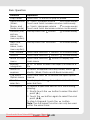
1. Left click the
icon at the right hand corner of the taskbar.
2. Click on the pop-up mini-window with message of “Safely
Remove the USB Mass Storage Device – Drive (X:)”.
3. When you are prompted to remove the device, pull out the
player.
Windows98
Please make sure the data transfer is completed before unplugging the MP3 player.
Macintosh
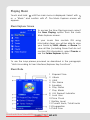
1. On the left side of the Finder Window,
identify the appropriate Removable Disk
icon.
2. Click on the “Eject” arrow on the right of
the Removable Disk icon.
3. Disconnect the USB cable from the player and your computer.
Downloaded from ManualMPlayer.com
English –Manuals
9 | MP-470