1
2. Using the Camera Standalone
Mount the Kameleon securely to your desired system using its four mounting holes, and then fix the
camera using the M3 threaded hole on its bottom plate. Connect the camera to the REB as described
in section 1. Plug the power cable from the camera into the corresponding port on the REB, and
connect the RCA video output jack to your monitor or frame-grabber. Now connect the two power
cables to the Kameleon (8-pin AMP connector) and to the REB (2-pin Wago connector), and hook
them up to a 12v DC source.
You may either command the camera from a simple ASCII terminal via the serial port, or write your
own custom C program. It is recommended you first test the camera from a terminal before writing
your custom C program.
2.1. Using the Functions from a Terminal
First you must set the Kameleon into Serial Communications (SerCom) mode by adjusting the DIP
switches located near the power connector as shown in figure 2.
1 2 3 4 5 6 7 8
OFF
SerCom 38400
Figure 2 – DIP switch modes
You may use any standard ASCII terminal program to communicate with the Kameleon (e.g.
HyperTerminal for Windows, Microphone for Mac, Minicom for Linux). Ensure it is properly
configured for 38400 baud, 8 bit, no parity, and 1 stop bit. Connect a standard serial cable to the
Kameleon 9-pin DSUB serial port connector and turn on the power to the Kameleon. You should see
the following on your terminal screen (the version number may vary depending on your BIOS
version):
ROM of K376SBC, (C) E.Franzi, P.Arnaud, K-Team SA, R1.15 (11 Jul 2000)
REB support by C.Jaquet, K-Team SA
Serial Communication Protocol
A test program has been stored in the Kameleon’s flash memory. To run it, type: run user-flash
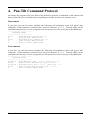
The pan-tilt camera should perform an automatic calibration and center itself when finished. A simple
ASCII protocol is provided for commanding the motors either from a terminal or from another device
communicating over the serial port. Please see section 4 for a description of this protocol.
2.2. Writing a C Program
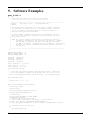
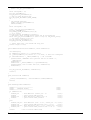
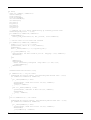
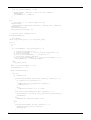
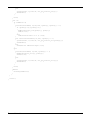
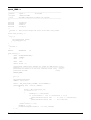
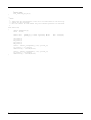
The source code of the above-mentioned test program (pan-tilt.c) is included to demonstrate how to
program the pan-tilt camera. You are invited to study it and use elements of it in your own
applications.
For more information on available C functions for the Kameleon or the REB, please see their
respective documentation available from the K-Team website (http://www.k-team.com). For general
information on how to compile your C program and download to the Kameleon, please see the GNU
cross-compiler documentation also available from the K-Team website.
PAN-TILT USER MANUAL
3