1
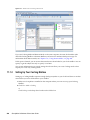
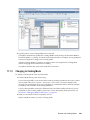
11 Remote and Caching Modes 1 You can store a copy of your mailbox (including your messages and other information) on your local drive in two different ways. Caching mode saves network traffic because it doesn’t require continuous access to the network, while Remote mode allows you to specify the type of connection you have and also allows you to restrict how much information is retrieved. Section 11.1, “Using Caching Mode,” on page 261 Section 11.2, “Using Remote Mode,” on page 266 To see how to back up your mailbox while in Remote or Caching mode, see Section 16.6, “Backing Up E-Mail,” on page 381. 11.1 Using Caching Mode Caching mode stores a copy of your network mailbox, including your messages and other information, on your local drive. This allows you to use GroupWise whether or not your network or Post Office Agent is available. Because you are not connected to the network all the time, this mode cuts down on network traffic and has the best performance. A connection is made automatically to retrieve and send new messages. All updates are performed in the background so your work is not interrupted. You should use this mode if you have enough disk space on your local drive to store your mailbox. Section 11.1.1, “Understanding Caching Features,” on page 261 Section 11.1.2, “Setting Up Your Caching Mailbox,” on page 262 Section 11.1.3, “Changing to Caching Mode,” on page 263 Section 11.1.4, “Setting Caching Properties,” on page 264 Section 11.1.5, “Working in Caching Mode,” on page 264 Section 11.1.6, “Changing the Download Interval Time for Your Caching Mailbox,” on page 264 Section 11.1.7, “Synchronizing Your Caching Mailbox with Your Online Mailbox,” on page 265 Section 11.1.8, “Opening a Different Version of a Document in Your Caching Mailbox,” on page 265 Section 11.1.9, “Viewing Pending Requests,” on page 266 Section 11.1.10, “Displaying Connection Status,” on page 266 Section 11.1.11, “Changing the Download Interval Time for Your Caching Mailbox,” on page 266 11.1.1 Understanding Caching Features Most GroupWise features are available in Caching mode, with the exception of subscribing to other users’ notifications. Several users can set up their Caching Mailboxes on a single shared computer. Remote and Caching Modes 261