1
CFG (special command) 1 (profile number);GPS: (settings group) 1,180,0,0,10,60,1,~,~;(parameters value)
Another possible way is to send a SMS message with configuration command, profile number,
settings group and parameters to the GH1201 by a mobile phone (message text example:
CFG1;TRACK:2,60;)
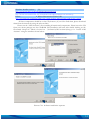
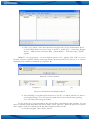
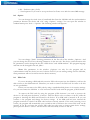
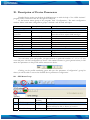
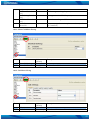
The program “GPS Assistant” can form you a sending text. Each setting group in the profile
has a “Configuration Thought SMS“ window (picture 8.5.1), where you can see the specific
configuration message text by clicking a “Replace“ button.
Picture 8.5.1 SMS settings window
When moving to another configuration group and changing parameters there, the values can
be joined to the previous SMS text by clicking the button “Append”. Below you will find text field
information about left characters, messages number, SMS receivers name and number.
Example:
CFG1;GEO1:1,Kaunas,54.94292,23.96668,1268,572,127,0,1439;
CFG – Special command to configure GH1201 through SMS
1 – Active profile number
; - Separator
GEO – Function name that you want to configure
1 – Geo-Fence zone number (zone counting start at 0 to 9)
: - Separator
1 – Zone enable (ON- 1, Off- 0)
, - Separator
Kaunas – Zone name (in this case a city name)
, - Separator
54.94292 – Latitude
, - Separator
23.96668 – Longitude
, - Separator
1268 – Geo-Fence radius (In SMS 1 means 10 meters so you should now that if you will enter
1268 it means 1268*10 = 12.680 m)
, - Separator
572 – Geo-Fence fence thickness (In SMS 1 means 10 meters so you should now that if you
will enter 572 it means 572*10 = 5.720 m)
, - Separator
127 – Week days (All days) (each day is assigned a unique number, this number indicates which
day has been marked. Monday – 2, Tuesday – 4, Wednesday – 8, Thursday – 16, Friday – 32, Saturday
– 64, Sunday – 1. If you want to mark multiple days, for example Wednesday and Thursday, you
should enter the numeric sum of those days (8+16=24) ).
, - Separator
0 – Start time (min) (00:00)
, - Separator
21