1
Royal Haskoning
Triwaco User's Manual
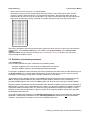
As can be seen from the example TIM-file, a time series and corresponding parameter values should be
defined for each object in the map file (each having a unique ID). After 'Time series allocation' is selected
and the TIM-file is defined, allocation can be carried out.
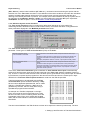
All usual methods for allocation in space can be used in combination with the time series allocation. In fact
the TIM-file replaces the usual par file. Prior to the actual allocation, one can select 'Test Generate TSA file'.
An intermediate file is created in which the result of the conversion to average values or intensities for each
stress input time is given. Selecting 'Allocate' from the 'Parameter' pull-down or pop-up menu runs the actual
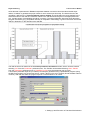
allocation program and the result is written to a file containing multiple adore sets. The parameter names of
the various adore sets consists of the 'usual' parameter name followed by the text string ",TIME=" and the
stress input time in days, relative to the start time of the calculation. Thus, the first adore set is labeled
"par,TIME= 0.00", with for par the standard Triwaco parameter name.
Note that if any one of the start or end time of calculation or the stress input period is changed (in the
'Transient dataset options window') all time dependent parameters in the 'Modified parameters' tabsheet have to be allocated again.
7.4.4 Definition of precipitation excess from Fluzo
For Transient simulations often time-dependent groundwater recharge is required. The module FLUZO
(explained in more detail in chapter 12, not yet available) simulates groundwater flow in the unsatureted zone
and determines the effective groundwater recharge. The effective groundwater recharge is one of the
parameters of the topsystem. The effective groundwater recharge is written to a file named fluzo.fzo. The
parameter RP1 is used to define the effective groundwater recharge in the Transient data set.
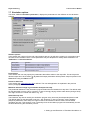
The transient groundwater recharge has to be defined in the 'Transient parameter information' window,
which can be accessed selecting 'Info' from the 'Parameter' pull-down menu. The fluzo result file fluzo.fzo has
a the standard adore file format. Select fluzo.fzo from the Fluzo directory (search for *.fzo). The definition of
RP1.ung, RP1.par can be neglected. Next activate the 'Time series allocation' type 'TIM with parameter
values to be converted to intensities' at the right-hand side of the 'Time ruler'. There is no need to allocate
this parameter since the resulting groundwater recharge is already in the appropiate adore format (fluzo.fzofile). To prevent from accidental allocation select None as allocator.
It is important to realise that the simulation period (start and end-date) as well as the timestep size have to be
identical for both the Fluzo simulation and for the Transient simulation.
7 Setting up and Execution of Transient Simulations-9