1
5
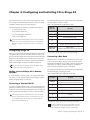
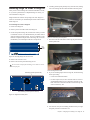
To lock the Top Panel in the vertical position, tighten the two
interior captive thumbscrews located on the top left and top
right sides of the console.
8
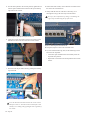
On the back of the console, remove the four screws that secure
the card to the console chassis.
9
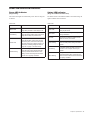
Gently slide the card out of the slot. If necessary, use a
flat-edged tool to pry the card away from the chassis.
Do not pry the card from the top. Doing so can damage the
copper strips located along the top of the card.
Figure 18. Tightening the top left captive thumbscrew
6
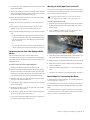
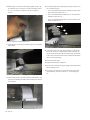
Locate the card in slot D and loosen the two interior captive
thumbscrews that secure the card to the console chassis.
Figure 21. Removing the card from the slot
10
If required, repeat to remove the card from slot E.
11
If you are finished removing cards, do the following to close
and secure the Top Panel:
• Loosen the captive thumbscrews and carefully lower the
Top Panel into position.
• Replace the screws that secure the Top Panel to the console
chassis.
Figure 19. Loosening the captive thumbscrews
7
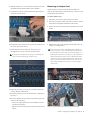
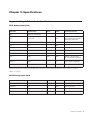
Disconnect the 50-pin ribbon cable by pushing the retaining
clips outwards.
Figure 20. Disconnecting the 50-pin ribbon cable
Leave the disconnected ribbon cable in the console. Do not
attempt to remove it. Tuck the unconnected end of the cable
and any excess cabling in the gap along the inner right side of
the console.
16
Stage 48