1
4.6
4.6.3
Expansion Module MAC00-FD4
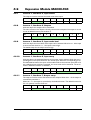
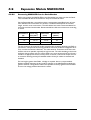
Node-id, Baud-rate and Termination setup
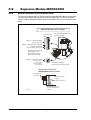
The 10-way dip switch (SW1) is used to select the node ID and the Baud-rate. Switches
1-6 select the node ID, and switches 8-9 select the Baud-rate. The 2-way dip switch
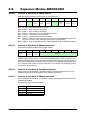
(SW2) is used to enable termination. When both switches are on, the termination is enabled.
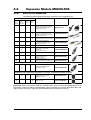
MAC00-FD4 Dip switch settings
Mini dip-switch
OFF
Dip 1-6 - Node-id setting
(address range 0-63)
Dip 7 - Node-id set by software
Dip 8-9 - Baud rate
(Baud rate setting 125k to 500k)
Dip-switch 10 is not used.
Set in position “ON”.
SW1 default settings =
all set in position “ON”
Dip 1-2 - Line termination
Both set to ON =
Term. enabled
Both set to OFF =
Term. disabled
ON
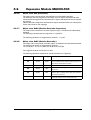
Rear side of the MAC00-FD4
expansion module
1
2
3
4
5
6
7
8
9
0
SW1
1
2
SW2
SW2 default settings =
Both switches in position “OFF”
Dip-switch location on the
MAC00-FD4 Expansion module
M12 external
connectors
Basic MAC motor
housing
Internal circuit boards
TT1017GB
210
Dip Switches placed
on the rear side of the
module
JVL Industri Elektronik A/S - User Manual - Integrated Servo Motors MAC050 - 3000