1
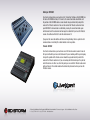
Behringer BCF2000:
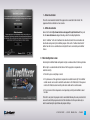
To activate communication, you must press the “Connection” button on the BCF2000 (See
the table of BCF2000 functions). If it connects, the connection button should blink and
the position of the BCF2000 volume cursors should change automatically to adjust the
values of the TriCaster audio mixer. You can then control the TriCaster audio mixer from
your BCF2000. If communication is established, pressing the connection button again
will disconnect and the audio mixer will no longer be controlled. If you close the TriCaster
session, the software will detect it and will also disconnect it.
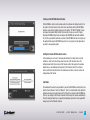
If you press the connection button and it does not keep blinking, there is a problem with
communication or more likely the control module is not in operation.
Yamaha 01V96i:
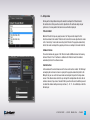
To activate communication, you must move one of the Yamaha volume cursors for one of
the layers with which you have selected to work. If you are working with the general group
of layers the position of the Yamaha cursors should change automatically to match the
values of the TriCaster audio mixer; if you are working with the Remote layer they will not
match themselves. In either case, from this point you can control the TriCaster audio mixer
with your Yamaha. The control module will automatically disconnect when you close the
TriCaster session.
3D Storm is the distributor of NewTek products in EMEA and LiveXpert worldwide - 70, Avenue de Capeyron - 33160 Saint-Medard-en-Jalles, France
T: + 33 (0) 5 57 262 262 - F:+ 33 (0) 5 57 262 261 - info@3dstorm.com