1
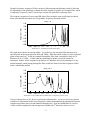
musically interesting spectral modification.
4. Graphical user interface
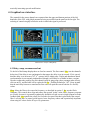
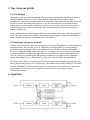
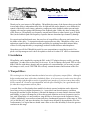
The controls for the stereo channels are separated into the upper and bottom portions of the lefthand side of the GUI, with global parameters being accessible from the panel on the far right. The
ordering of controls roughly reflects the order in which the signal is processed.
Illustration 3: GUI for 2WarpDelay
4.1 Delay, warp, resonance and cut
To the left of the bitmap display there are four bar controls. The first control, Dly, sets the channel's
delay time. If the delay is not synchronised to the tempo, the delay is set in seconds. If it is synced,
then the delay is set in terms of 16th, 8th, quarter, half or whole notes. Triplet and dotted note-based
synchronisation is not currently implemented, though it will likely be available in future versions.
In order to adjust the predelay for each channel (used for ping-pong echoes, amongst other effects),
click on on Dly, and the label will be replaced with Pre. Predelay defaultsl to "off". Keep in mind
that the total delay between a sound and its first echo will equal the sum of both the Pre and Dly
values.
Warp allows the filter to be warped in frequency, as described in section 3. Res sets the filter's
resonance. This controls how steep and narrow the spectral "peaks" in the filter's frequency response
are. Finally, because it is generally aesthetically desirable to avoid excessive high frequencies in the
feedback path, Cut controls the cutoff of a first order low pass filter that is placed after the warped
filter. Lowering the Cut control yields bassier, lower frequency echoes and is particularly important
when using low values for the Warp or Dly parameters.
-3-