1
Zone Parameters
Program
Whenever this parameter is set (or the Setup containing it is called up), a pair of MIDI
Controller Messages known as Registered Parameters are sent on the MIDI channel assigned to
this Zone. These messages will set the coarse and Þne pitchbend range of any MIDI instrument
receiving data on this channel from the PC88, as long as that instrument recognizes the
messages. It will set itself to respond to pitchbend commands exactly the same way as the
Zone on the PC88. Since this a relatively recently-adopted addition to the MIDI speciÞcation,
there are plenty of instruments that donÕt recognize Registered Parameters Ñ if you want to
adjust the pitchbend range on one of those, youÕll have to do it by hand. The PC88 not only
sends them, it also recognizes them, so if you send the PC88 these commands from an external
source (like another PC88), it will respond accordingly. (See Appendix F for more information
about Registered Parameters.)
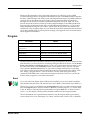
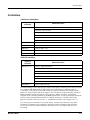
Program
Parameter
Values
(Program)
0 - 127 + name
Bank
(press <<< )
0:Internal Voices - 16383(127/127)
Entry Transmit
Off - On
Bank Mode
None, Ctl 0, Ctl 32, Ctl 0/32, K2000, K1000
PNumDisp
0-127, 1-128, 11-88, A1-H8
PNameDisp
Off, Internal, Gen. MIDI
The Þrst parameter under this button selects the program assigned to the Zone. When you Þrst
enter this menu, you have the choice of selecting among the 64 Internal Voices. Use the Sound
Select and Previous or Next Group buttons just as you would in Internal Voices mode, or use
the wheel and buttons in the Data Entry section, or use Intuitive Entry with any controller.
(DonÕt press the Internal Voices button or you will leave Setups mode and lose everything
youÕve done on this Setup!) If the Zone has been turned off, the program name will be ÒZone
OffÓ. Setting a program selects a voice for the Zone, and also sends a Program Change
command out the MIDI cable, on the channel assigned to the Zone. This is how you use the
PC88 to select programs on your other instruments.
Bank
As we saw in the last chapter, if the VGM board is installed, you can use sounds from Banks
other than the Internal Voices. The Internal Voices are in Bank 0; VGM sounds are in Banks 1-3.
There are two ways to access Banks from the Program menu. One is to use the numeric keypad:
Press the Program button, enter the number of the Bank, and then press the Ò+/-Ó button (next
to the Ò0Ó button). Then enter the Program number, and press Enter. The +/- button creates a
colon (Ò:Ó) in the display, which separates the Bank number from the Program number.
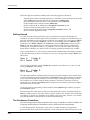
The second method uses a special Bank parameter. From the Program display, press the left
cursor button (<<<). Now the display says ÒBank:Ó and the name, if there is one, of the Bank.
Musician’s Guide
5-3