1
Zone Parameters
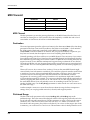
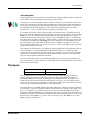
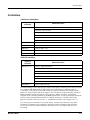
MIDI Transmit
MIDI Transmit
Parameter
MIDI Channel
Dest
BndRng (ST)
BndRng (ct)
Values
Off, 1-16
Local, MIDI, Local+MIDI
0-127
0-127
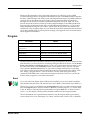
MIDI Channel
The Þrst parameter you see after pressing this button is the MIDI channel that the Zone will
send data on. Setting this to ÒOffÓ turns the Zone off completely: no MIDI data and no local
sound either. A Zone that is off will have a dark Zone button.
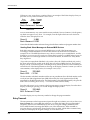
Destination
The second parameter (press the right cursor button) is the destination (Dest) of the data being
generated in the Zone. Data can be sent either to the PC88Õs sounds (Local Ñ which includes
the VGM sounds if the board is installed); out the MIDI Out jack (MIDI); or both
(Local+MIDI). Note that if MIDI is not selected, and you play the PC88 into a sequencer, you
may hear nice sounds, but the sequencer wonÕt record anything from this Zone.
Generally speaking, each Zone will have its own MIDI channel. This is necessary if you want to
layer sounds on the PC88. If two Zones have the same MIDI channel (and destination), but they
have different Program settings, there will be conßicts: no MIDI device, including the PC88, can
respond correctly to two different simultaneous Program Change commands on one channel.
The result will be that only one Program Change will be recognized, but every note played will
sound double. This can create unpredictable odd timing effects, and will reduce polyphony by
50%.
There will, however, be occasions when ÒstackingÓ Zones on the same MIDI channel might
come in handy. One such situation would be if you would like a physical controller on the PC88
to send data out on two different numbered MIDI controllers on the same channel. In this case,
you must create two Zones assigned to the same channel, but with different controller
assignments. If a receiving synth is using Controller #1 for modulation depth and Controller
#13 for modulation speed, for example, you can increase both the depth and the speed with one
slider by assigning that slider in Zone 1 to #1 and in Zone 2 to #13, and assigning both zones to
the same MIDI channel. (You will probably want to do something to make sure you arenÕt
sending doubled notes. Use the Key Range parameter to make sure the two zones arenÕt set to
the same note range.)
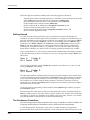
Another example: create two or more Zones that are identical except for their transposition
settings. Now you can play parallel intervals (or chords) with single keystrokes.
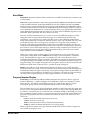
Pitchbend Range
The third and fourth parameters in this menu, BndRng (ST) and BndRng (ct), set the
pitchbend range. This is the interval that the pitch wheel will change the pitch at the end of its
travel, both top (up) and bottom (down). The Þrst parameter is coarse, which sets the range in
semitones (ÒSTÓ). The second is Þne, which sets it in cents, or 1/100ths of a semitone (ÒctÓ).
Since both values are positive, they add to each other: If you want to set the range to just under
3 semitones, you would set ST to 2 and ct to 99. The maximum value for both parameters is 127.
5-2
PC88