1
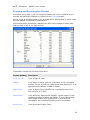
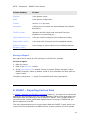
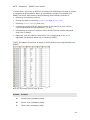
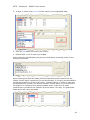
WITS – Simulation – SMART's User Manual in many cases, users rely on WITS for providing with trade flows but want to update or complete tariff information. Below is reproduced a sample file exported from SMART into Excel, after clean-up and formatting which basically consists of: Removing unnecessary columns; Removing column headings (first row); Sorting the table by increasing product code and partner code; Formatting numbers with the same number of decimals for a given column, removing thousand comma separators (,) if any; Left aligning all columns in order to easily identify where a column starts and ends once in SMART. Optionally, you may want to remove any row corresponding to the World aggregate (all partners) which will be rebuilt by SMART. Finally, the dataset should look as below (in Excel) before being imported back into SMART: Note: the screenshot does not show all rows Column Content A Product code (mandatory data) B Partner code (mandatory data) C Trade value (mandatory data) 44