1
Setup and Connections
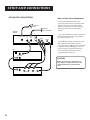
Advanced Connection
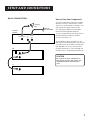
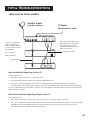
How to View Your Components
SATELLITE
DISH
CABLE OR
OFF-AIR ANTENNA
SATELLITE
RECEIVER
SATELLITE IN
OUT
TO
TV
IN
FROM
ANT
VIDEO
S-VIDEO
To view VCR recordings, tune the TV to the
VCR output channel (usually channel
3 or 4) and set your VCR to play. If your VCR
is a brand other than RCA, GE, or PROSCAN,
you may need to program the remote to
control the VCR. See the next section,
“Programming the Remote.”
VCR
CH3
CH4
To record programming, tune the receiver to
the desired channel. Then set your VCR to
record on channel 3 or 4.
R
AUDIO
L
To watch the satellite receiver in this
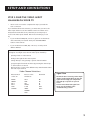
connection, tune the TV to the video input
channel. (To find your TV’s video input
channel, follow Step 3 on the next page).
Then tune the receiver to the desired
channel.
IN FROM ANT
OUT TO TV
CAUTION
Do not stack electronic components or
other objects on top of the receiver. See
“Safety Information” inside the front
cover.
TV
IN
8
R AUDIO L
VIDEO
S-VIDEO