1
Setup & Connections
What you will need:
• Eight (8) A/V cables
• Three (3) video grade (or component video) cables
• One (1) telephone line cord
• Coaxial cable lines fed from a digital satellite antenna and a standard TV antenna (or cable feed)
Making the Connection
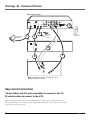
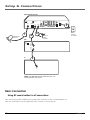
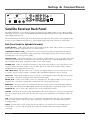
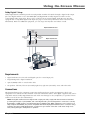
1. Connect the satellite dish antenna feed (RG-6 coaxial cable) to the SATELLITE IN jack on the satellite receiver.
2. Connect the cable box or off-air antenna feed (RF coaxial cable) to the IN FROM ANT jack on the satellite
receiver.
3. Connect one end of the supplied telephone line cord to the PHONE JACK on the back of the satellite receiver,
and the other end to an RJ11-type modular phone jack (the most common type of phone jack).
4. Connect the ends of the supplied A/V cables to the AUDIO and VIDEO jacks on the back of the digital
satellite receiver. Connect the other ends of the A/V cables to the corresponding Audio/Video input jacks
on the back of the VCR.
Note: Make sure you connect jacks corresponding to their labels. For example, VIDEO Out on the digital
satellite receiver should be connected to VIDEO IN on the VCR, AUDIO R OUT to the VCR’s right audio input
jack, etc.
5. Connect the ends of a second set of A/V cables (not supplied) to the AUDIO and VIDEO output jacks on
the VCR. Connect the other ends of the A/V cables to the corresponding Audio/Video input jacks on the
back of the TV.
6.
Connect the ends of the component video cables (not supplied) to the COMPONENT VIDEO jacks on the
digital satellite receiver. Connect the other ends of the component video cables to the corresponding input
jacks on the back of the TV.
Note: Make sure you connect jacks corresponding to their labels. For example, Pr Out on the digital satellite
receiver should be connected to Pr IN on the TV, Pb OUT to Pb IN, etc.
7. Connect cables to the digital satellite receiver’s second AUDIO OUT jacks and the other ends to the
corresponding Audio input jacks on the TV.
Go to Page 18
Using Your Components
To watch DIRECTV® programming:
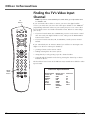
Tune the TV to its Component video input channel (if you have difficulty finding your TV’s Component input
channel, see your TV’s User’s Manual, or see page 68 in this manual for additional information). When the TV
is tuned to the component video input channel, tune the satellite receiver to the desired channel.
To record DIRECTV® programming:
Tune the satellite receiver to the desired channel. Then set your VCR to record on its video input channel.
Begin recording as usual.
To view VCR recordings:
Tune the TV to its video input channel (if you have difficulty finding your TV’s video input channel, see your
TV’s User’s Manual, or see page 68 in this manual for additional information). Begin VCR playback as usual.
Chapter 1
9