1
Read this before operating your camcorder
Before operating the unit, please read this
manual thoroughly, and retain it for future
reference.
Notes on use
Handling the images recorded on your
camcorder on a computer
Refer to “PMB (Picture Motion Browser)
Guide” stored on the supplied CD-ROM.
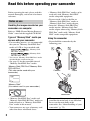
Types of “Memory Stick” media you
can use with your camcorder
• For recording movies, it is recommended
that you use “Memory Stick PRO Duo”
media of 1 GB or larger marked with:
–
• “Memory Stick PRO Duo” media can be
used only with “Memory Stick PRO”
media compatible equipment.
• Do not attach a label or the like on
“Memory Stick PRO Duo” media or
“Memory Stick Duo” media adaptor.
• Insert the “Memory Stick PRO Duo”
media into the “Memory Stick Duo”
media adaptor when using “Memory Stick
PRO Duo” media with “Memory Stick
PRO” media compatible equipment.
Using the camcorder
• Do not hold the camcorder by the
following parts.
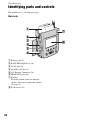
(“Memory Stick
PRO Duo” media)*
–
(“Memory Stick
PRO-HG Duo” media)
* You can use “Memory Stick PRO Duo” media
whether Mark2 is indicated or not.
• See page 15 for the recordable time of
“Memory Stick PRO Duo” media.
“Memory Stick PRO Duo”/“Memory Stick
PRO-HG Duo”
(This size can be used with your
camcorder.)
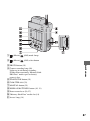
Camera
Cable
“Memory Stick”
(You cannot use it in your camcorder.)
Jack cover
• “Memory Stick PRO Duo” media and
“Memory Stick PRO-HG Duo” media are
both referred to as “Memory Stick PRO
Duo” media in this manual.
• You cannot use any type of memory card
other than those mentioned above.
2
• The camera of the camcorder is splashproof but the main body is not, therefore
never wet the main body of the
camcorder. See “About handling of your
camcorder” (p. 79).