1
User Manual
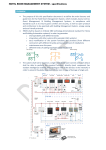
The user sees the above page once logged into MyFareBox
MyFareBox.
Box The following are the options on the user
home page.
a) Flight Search Tool
b) Queues
TripJoint powered by MyFareBox
MyFareBox Queues:
TripJoint powered by MyFareBox
MyFareBox offers the following queues to its users:
1)
2)
3)
4)
Quote Queue
Booking Queue
Ticket Order Queue
Ticketed Queue
5) Exception Queue
1) Quote Queue
The quotes saved during the process of Flight Search can be managed from the Quote Queue, which
accessible from the Queue option as shown in the image. You may click on the Quote Reference
number to view the information of the quote
2) Booking Queue
All bookings made by the users of the branch or implant location will be visible under the booking
queue. Bookings can be filtered using the Apply Filter function.
Mystifly Consulting (India) Private Limited
Page 3