1
69
User Interface
Introduction
These topics describe the menus and menu items in Flip Player.
Topics
Flip Player Menu
File Menu
Edit Menu
Control Menu
Audio Menu
View Menu
Export Menu
Window Menu
Help Menu
Flip Player Menu
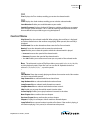
About Flip Player Displays the version of Flip Player you are running.
Check for Updates Provides a short-cut to Preferences > Check Now.
Preferences Opens the Preferences window. If the Preferences window is already open,
it becomes the active window.
Services Presents the Macintosh Services available.
Hide Flip Player Hides the Flip Player application window.
Hide Others Hides all application windows other than Flip Player.
Show All Shows all application windows.
Quit Flip Player Closes all files and exits. If a file has been modified but not saved, you
are notified and you must save the file (or discard changes) before exiting Flip Player.