1
Flip Player Basic Features
Movie Playback and Editing Controls
Play Bar
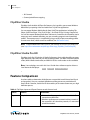
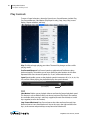
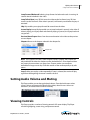
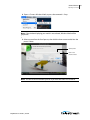
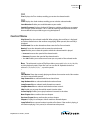
The features of the Play Bar are shown below.
Play Bar
Scrubber
Elapsed Time
Progress Bar
Volume Control
Time Remaining
Play/Pause
Play/Pause Click to play the video; click again to pause it.
Note: In addition to clicking Play/Pause on the Play Bar, you can also play and pause
by pressing the spacebar. It acts as a toggle between play and pause modes.
Elapsed Time Displays time the video has been playing.
Scrubber Click and slide to change the location in the video you are viewing. You can
also click on any position in the scrubber to jump the play head to that location.
Progress Bar The progress bar indicates how much of the media has been
downloaded.
Elapsed Time Displays time remaining for the video to play.
Volume Control Click to display a volume control slider.
Flip4Mac User’s Guide | 159841
39