1
2
Operation:
2.1
Power Up/Power Down
Powering Up:
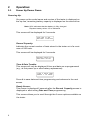
On power up the model name and version of the tester is displayed on
the top line, remaining battery capacity is displayed on the second line.
Note: 99% indicates that the battery is fully charged.
Replace battery when 1% is indicated.
This screen will be displayed for 2 seconds.
FSD-100 V1.00
BATTERY LIFE=99%
Record Capacity:
Indicates the current number of tests stored in the tester out of a maximum of 500 tests.
This screen will be displayed for 2 seconds.
RECORD CAPACITY:
300/500 FILLED
Time & Date Trouble:
This screen will only be displayed if time and date are unprogrammed
(e.g., at first power up or after battery replacement).
TIME & DATE TRBL
PRESS * TO PROG.
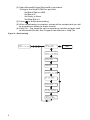
Press # to save date and time programming and advance to the next
screen.
Ready Screen:
This screen is displayed 2 seconds after the Record Capacity screen is
displayed or after exiting Date and Time programming.
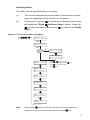
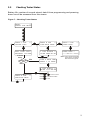
This screen allows you to scroll through the 6 menu options available on
the tester.
4