1
ii. Documentation can also be found throughout the PCT software itself by
clicking on "Help" (either in the main menu or in dialogue boxes relating
to individual functions).
C. Citation:
i. Hall, Kathleen Currie, Blake Allen, Michael Fry, Scott Mackie, and
Michael McAuliffe. (2015). Phonological CorpusTools, Version 1.1.0.
[Computer program]. Available from:
https://github.com/PhonologicalCorpusTools/CorpusTools/releases.
III. Sample Corpora1
A. Five possible ways to get a corpus into PCT:
i. use a built-in corpus
ii. use a pre-formatted (e.g., CSV or tab-delimited) corpus file on your
computer
iii. create a corpus file from running text
iv. create a corpus file from Praat TextGrids
v. import a corpus from your own local copy of another standard corpus
(currently, we support the Buckeye corpus and the TIMIT corpus)
B. Built-in corpus (requires internet connection for initial access):
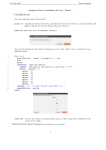
i. go to the “File” menu
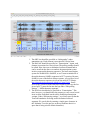
ii. select “Load corpus...” from the list, which will open the “Load corpora”
dialogue box
iii. click on “Download example corpora” from the right-hand menu
iv. download either of the two example corpora (one is called “example” and
the other called “Lemurian” (both are entirely made up; see
http://corpustools.readthedocs.org/en/latest/examplecorpora.html#example
-corpora) and/or the IPHOD corpus (Vaden et al. 2009)
v. the corpus appears in the lefthand side of the “Load corpora” dialogue box
vi. select the corpus and click on “Load selected corpus”
vii. Once these corpora have been downloaded once, you don’t have to do so
again; they will be saved automatically to your local system unless and
until you delete them.
C. Creating a corpus file from pre-formatted file, running text, TextGrids, or other
standards:
i. can be created from local files on your computer
ii. for examples, go to
https://www.dropbox.com/sh/v4l29isywe532an/AAB_a1mQqaEzBpirEY6
a62Xha?dl=0 (this is the entire folder; see also below for individual links)
iii. Go to “File” / “Load corpus...” and then choose “Import corpus”
iv. select the file using “Choose file...” and navigating to it from a system
dialogue box
v. Enter a name for the corpus in the box to the right of the corpus source
selection
1
see complete info. at http://corpustools.readthedocs.org/en/latest/loading_corpora.html
2