1
Lab Preparation
It is highly recommended that the student read through this entire procedure once before actually using it as
a tutorial. By understanding the final goal, it will be easier to use this as a tutorial and, as a learning guide.
Ensure the Lab shells are loaded as part of the software installation.
Equipment and Materials
It is assumed that the student has already completed prior labs and the software is installed properly.
Software needed
Quantity
Install the required tutorial software from the autoinstaller located at
1
http://cosmiac.org/thrust-areas/academic-programs-and-designservices/education-and-workforce-development/community-portal/ For this
lab, the Putty software is also required. This is a free executable package that
helps with a variety of serial capabilities.
Hardware needed
Quantity
The hardware required is the TI Tiva LaunchPad Kit and the Digilent Orbit
board
1
Additional References
The Evaluation Board user’s manual is on this web site: http://datasheet.octopart.com/EK-TM4C123GXLTexas-Instruments-datasheet-15542121.pdf and the manuals for the Digilent orbit board are located at
http://digilentinc.com/Products/Detail.cfm?NavPath=2,396,1181&Prod=ORBIT-BOOSTER.
To download Putty, go to http://www.putty.org/.
COSMIAC tutorials found at: http://cosmiac.org/thrust-areas/academic-programs-and-designservices/education-and-workforce-development/microcontrollers/ate-developed-material/
Lab Procedure : Install/Connect board to computer
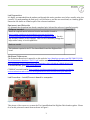
Figure 1. ARM and ORBIT Combination
This picture of the correct way to mate the Tiva LaunchPad and the Digilent Orbit boards together. Please
do so at this point and connect them as shown in Figure 1.
2