1
Quick Start Guide Page -3-
Section 1: Software setup and
orientation
This section will walk you through installing the software and loading the correct settings for
your machine. It will also explain some fundamentals of the control software including basic
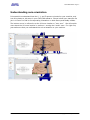
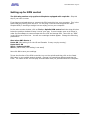
commands, understanding axis orientation, and running the various components (motors,
spindle, etc) outside of a part file.
The first step: Loading the Software and drivers
Do not connect the Shopbot to your computer before installing the software and
drivers!
Special note for schools and large companies: This software runs best with full
administrative permissions enabled. We strongly advise against setting up separate admin
and user accounts on the control computer.
For international customers: The computer used to run the machine MUST have the
language set to United States English in order for the software to run correctly.
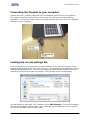
Connect the USB flash drive to your computer to install the software. Double-click on
“Install_Shopbot” to run the installation.
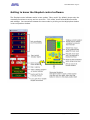
Once the installation completes, you should see four new icons on your screen: Shopbot 3,
Shopbot Editor, V-Carve Pro ShopBot Edition, and Partworks 3D.
Copyright 2013 ShopBot Tools, Inc