1
centers the bass range. Settings up to 1 kHz are
possible. These setting can be audible; however,
such setting can be of advantage to regain mono
compatibility using enhanced base width.
HI and MID EQ are part of the internal S-Channel and
affect only the spatial components of the stereo signal.
Boosting results in a wider base in the boosted
frequency range.
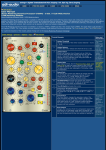
8
Frequency Control of the Shelving HI-EQ's
9
Boost/Cut Control of the HI-EQ's
10
Frequency Control the bell type, fully parametric MID
EQ
11
Q-Factor Control of the fully parametric MID-EQ
12
Boost/Cut Control MID-EQ's
The LOW-EQ is part of the internal M-Channel and
affects only the mono components of the stereo signal.
Boosting results in a reduced base width of the
frequency band.
13
Frequency Control of the bell type, fully parametric
LOW-EQ
14
Q-Factor Control of the fully parametric LOW-EQ
15
Boost/Cut control of the LOW-EQ
16
The EQ Switch activates all 3 Equalizer Bands.
The EQ bands of the
W731 allow frequency
depending control of the
stereo base width. The
Hi- and Mid-EQ are part
of the internal Schannel and affect only
the spatial signal
components. Boosting
frequencies will enhance
the base width, cutting
reduces the base width
in the particular band.
The fully parametric low
eq is part of the internal
M-channels and affects
only the mono
components. It is
usually used to center
the low frequency
range. Boosting reduces
the base width.
The MS-EQ W785MS can
be used together with
the W731 to add 5
additional EQ bands.
More details are below.
If the optional extension
EQ W785MS is installed,
the EQ switch also
activates the EQ bands
of the external EQ.
Initial Setting
The following setting results in a neutral setting of all stages:
1. Insert the unit with the DIR-ON switch (5)
2. Set the INPUT MS Switch (1) to the correct format (pressed if the input signal has
M/S format, not pressed if the input signal is a left-right stereo signal)
3. Set the OUTPUT MS Switch (2) to the correct format (pressed if the output signal
should have M/S format, not pressed if the output signal should be a left-right
stereo signal)
4. Set the BASE control (3) to the 1.0 position (center - no change of the base
width)
5. Set the DIR control (4) to the M position (center - no change of the left-right
balance)
6. Leave the elliptical equalizer switched off - EEQ switch (6) not pressed
7. Set the elliptical EQ Frequency Control (7) to 300 Hz (300 Hz - no audible
influence)
8. Set all boost/cut controls of the 3 eq bands (9, 12, 15) to the 0 position (center no level shift)
9. Leave the EQ switched off - EQ switch (16) not pressed
10. The remaining eq controls are only important when you start using the eq.
...TOP
Quickstart
a) Change the setting of the Base control (3) and try to find a setting that results in
an improved spatial image. With mastering the range between 1.1 and 1.3 is the
most interesting range. It adds some base width and depth, and usually causes an
improvement without negative effects. Please note, that you can do good or harm
to the signal; so check carefully by switching the module on and off, if the setting is
really of advantage or not.
Make sure that you always check the mix in Mono when a setting has changed!
Settings above 1.3 are only possible if the original mix is very narrow. If you add