1
INDEPTH
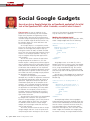
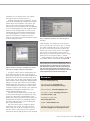
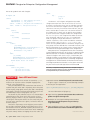
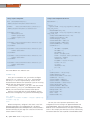
Listing 1. Apache Configuration
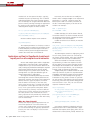
Listing 2. SOGo Configuration Parameters
Alias
NSGlobalDomain = {
/SOGo.woa/WebServerResources/ \
<GNUSTEP_LOCAL_ROOT>/Library/SOGo-0.9/WebServerResources/
};
"sogod-0.9" = {
AliasMatch
AgenorProfileURL = "http://sogo:sogo@127.0.0.1:5432/sogo/
/SOGo/so/ControlPanel/Products/(.*)/Resources/(.*) \
<GNUSTEP_LOCAL_ROOT>/Library/SOGo-0.9/$1.SOGo/Resources/$2
¯sogo_user_profile";
NGUseUTF8AsURLEncoding = YES;
OCSFolderInfoURL = "http://sogo:sogo@127.0.0.1:5432/sogo/
<LocationMatch "^/SOGo*">
AddDefaultCharset UTF-8
¯sogo_folder_info";
SetHandler ngobjweb-adaptor
SOGoAppointmentSendEMailNotifications = YES;
SetAppPort <sogod-0.9 port>
SOGoAuthentificationMethod = LDAP;
SOGoDefaultLanguage = English;
</LocationMatch>
SOGoDefaultMailDomain = example.com;
SOGoDraftsFolderName = INBOX.Drafts;
<LocationMatch "^/SOGo/so/ControlPanel/Products/.*UI/Resources/.*png">
SOGoFallbackIMAP4Server = localhost;
SetHandler default-handler
SOGoLDAPSources = (
</LocationMatch>
{
CNFieldName = displayName;
<LocationMatch "^/SOGo/so/ControlPanel/Products/.*UI/Resources/.*gif">
IDFieldName = cn;
SetHandler default-handler
UIDFieldName = cn;
</LocationMatch>
baseDN = "ou=example,dc=com";
bindDN = "cn=superuser,ou=Users,dc=example,dc=com";
<LocationMatch "^/SOGo/so/ControlPanel/Products/.*UI/Resources/.*css">
bindPassword = 0xdeadk0w;
SetHandler default-handler
canAuthenticate = YES;
</LocationMatch>
displayName = "Corporate Directory";
hostname = 127.0.0.1;
<LocationMatch "^/SOGo/so/ControlPanel/Products/.*UI/Resources/.*js">
id = public;
SetHandler default-handler
isAddressBook = YES;
</LocationMatch>
port = 389;
}
The SOGo dæmon runs under this user:
);
SOGoMailSpoolPath = "/var/spool/sogo";
% adduser sogo
SOGoMailingMechanism = smtp;
SOGoOtherUsersFolderName = "Other Users";
Once you’ve created the user, you need to configure
Apache. Do echo $GNUSTEP_LOCAL_ROOT, and remember
the value, as it will be required shortly. Create the file
/etc/apache2/conf.d/SOGo.conf (elsewhere if you are not using
Debian) with the content shown in Listing 1.
You must replace <GNUSTEP_LOCAL_ROOT> with the echoed
value of $GNUSTEP_LOCAL_ROOT (/usr/GNUstep/Local under
Debian). Once the file has been created, restart Apache.
Now you can proceed with the SOGo database creation.
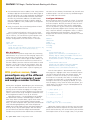
Because we use PostgreSQL here, perform the following steps:
SOGoSMTPServer = 127.0.0.1;
SOGoSentFolderName = INBOX.Sent;
SOGoServerTimeZone = Canada/Eastern;
SOGoSharedFolderName = "Shared Folders";
SOGoSpecialFoldersInRoot = YES;
SOGoTrashFolderName = INBOX.Trash;
SOGoUseLocationBasedSentFolder = YES;
WOMessageUseUTF8 = YES;
WOParsersUseUTF8 = YES;
WOPort = 25000;
WOUseRelativeURLs = NO;
% su - postgres
};
% createuser --no-createdb --no-adduser --encrypted --pwprompt sogo
}
% createdb -O sogo sogo
% exit
Before starting SOGo, configure it with a basic set of configuration parameters. The configuration file is located in
$HOME/GNUstep/Defaults/.GNUstepDefaults, where $HOME is
the home directory of your sogo user. Create this file with the
content shown in Listing 2.
78 | april 2008 w w w. l i n u x j o u r n a l . c o m
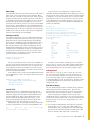
For now, the most important parameters in the
configuration file from Listing 2 are AgenorProfileURL and
OCSFolderInfoURL, which must point to your PostgreSQL
database server. SOGoLDAPSources must point to your LDAP
server. In this example, the LDAP source will be used not only
for authentication but also to provide a shared address book