1
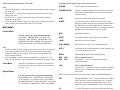
Following lists the function keys on the OSD:
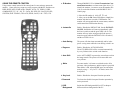
Following lists the function keys on the remote control:
Note:
1. Press the Menu button on the control panel or the remote control to display
the main menu.
2. Press the SEL +/- buttons on the control panel or remote control to scroll
through the menu.
3. Press the VOL +/- buttons on the control panel or the remote control to
adjust the setting values.
4. Press Sub-menu to return to upper level while in any sub-menu. To exit the
mode, press the menu button while in the top-level menu.
POWER
Starts or stops the monitor function.
POWER ON/OFF
To Start or stop the multiple monitors function in the mean
while. In general, this function is used well with multiple
monitors control.
DISP
Display the current mode on the present status.
SLEEP
To set the sleep timer, each press will increase the sleep
timer in 10-minute intervals up to 120 minutes (then back to
00). When the sleep count reaches the last 5 minutes, the
screen will show up every minute for 3 seconds. During the
last minute, and it will display every 10 seconds.
MTS
Multi-Sound selection.
MUTE
Cuts audio and turns audio back on. (not available)
JUMP
Returns to the previous channel.
ADD / ERASE
Allows the user to Add / Erase channels manually.
AUTO
Automatically scan all the channels by signal responds, and
to set them on the preset mode.
MENU
Enable/Disables the On-Screen Display Menu.
MAIN MENU
Picture Menu
Fine tunes the Picture image quality manually:
CONTRAST - BRIGHTNESS - H/V SIZE - H/V
POSITION - PINCUSHION - TRAPEZOID - TOPCORNER - BOTTOM-CORNER - PIN-BALANCE PARALLELORGAM - ROTATION and RECALL.
Note:
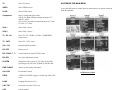
a. Recall will replace current settings by the factory-preset values. You can only
recall factory settings when the PC mode is in one of the 14 predefined
modes. See Table for preset modes. Color recall is used to call back the
factory setting of R.G.B.
b. Above parameters is for PC mode only, and can’t be reached in TV / AV
mode. In TV /AV mode, you can adjust the TVparameters by remote control.
Color Menu
Select the color temperature to make colors more pure
and vivid. Select user item to adjust the color intensity
by VOL + / -key.
MIC
MIC
VOL+
Special Menu
Fine tunes and sets the special functions manually:
ID-NUMBER ( 1-99 ) - INSTANT-ON - DEGAUSS AUTO-SAVING - AUTO DEGAUSS - AUTO SHIFT OSD BACKGROUND - OSD CONTRAST - AND OSD
H / V-POSITION - MOIRE, KEY LOCK - PASWORD.
SEL+
SEL-
This is a dual function key:
a. Press SEL + / - to serve as menu item selection.
b. MIC for R mode.
This is a dual function key:
a. Press VOL+ / - to control volume in any mode. (optional)
b. Press VOL+ to control the selection function while in
menu mode.
Note- Volume control function will effect while connect with Vision Converter.
SET
Through DM RS232 VO.9 (Serial Transmission Communication interface) to remote control the device. To identify
the monitor, you must to set an ID number (ID= 1-99) to
each of the monitor under DM RS232 VO.9 Control page.
ID
To set the ID number to control the monitor from the other.