1
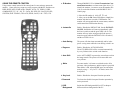
USING THE REMOTE CONTROL
a. ID Number
Using remote control instead of the control panel is convenient to operate the
monitor. Some of the keys must to work by connect with MATE, and these are
DISP, SLEEP, MTS, JUMP, ADD / ERASE, AUTO, TV, VIDEO, S-VHS,
COMPONENT, TV / PC / AV, TV / CATA, PIC-STD, PIC / PAGE, PIC-SEL,
SYSTEM, FINE TUNING, CH-LOCK, FIELD, LANG, CAP / TXT, CCD.
Through DM RS232 VO.9 (Serial Transmission Communication interface) to remote control the device. To
identify the monitor, you must to set an ID number (ID=
1-99) to each of the monitor under DM RS232 VO.9
Control page.
1. Select the ID number (1 -99) by
tab.
2. After you set the ID, choose high/light to identify the
monitor with has been set with a valid number. The
monitor will correspond with the current status, and this
could control the OSD function directly.
b. Instant-On
Enable / Disable the INSTANT-ON. Set the INSTANTON YES, the Monitor will start up immediately while
the Power switch on and the green LED is lit on. The
monitor will stay in the saving mode till the power is
turned-on again while the INSTANT-ON is switch off,
and the red LED is lit on.
c. Auto Saving
The power will shut down automatically and be in the
power- saving status while the Auto Saving switch is on.
e. Degauss
Enable / Disable the AUTO DEGAUSS.
The AUTO DEGAUSS will be executed automatically
by every 24 hours since switch on the function.
f. Auto Shift
Active AUTO SHIFT to protect the screen from result in
the image-remain. The picture will be auto-shift once
every 6 hours.
g. Moire
For some modes, it is better to switch the moire off to
get better video performance, and this option is provided
when Moire is ON, adjust MOIRE pops out, and adjust
moire by using + / - key. In TV / AV mode, moire can’t
be adjusted.
h. Key Lock
Enable / Disable the front panel function operation.
i. Password
To release the disable front panel function operation by
set the password.
j. OSD
Background
Switch the OSD background ON or OFF to adapt to
different software background of the PC.