1
ROUTINE
MAINTENANCE
The MAC 2000 Performance requires routine cleaning. The schedule depends heavily on the operating environment;
please consult a Martin service technician for recommendations.
Refer all service not described here to a qualified Martin technician.
Important! Excessive dust, smoke fluid, and particulate buildup degrades performance and causes
overheating and damage to the fixture that is not covered by the warranty.
Warning!
Disconnect the fixture from power before removing any cover.
Cleaning
Use care when cleaning optical components and work in a clean, well lit area. The coated surfaces are fragile and
easily scratched. Do not use solvents that can damage plastic or painted surfaces.
Inspect the air filters regularly and clean before they become clogged. Replace the air filters with new ones when
replacing the lamp.
To maintain adequate cooling, dust must be cleaned from the fans and air vents periodically.
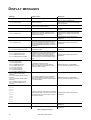
To clean optical co mpon ents
1
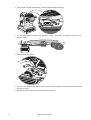
Disconnect the fixture from power and allow the components to cool completely. Remove the head cover.
2
Vacuum or gently blow away dust and loose particles with compressed air.
3
Remove stuck particles with an unscented tissue or cotton swab moistened with glass cleaner or distilled
water. Do not rub the surface: lift the particles off with a soft repeated press.
4
Remove smoke and other residues with cotton swabs or unscented tissues moistened with isopropyl
alcohol. A commercial glass cleaner may be used, but residues must be removed with distilled water. Clean
with a slow circular motion from center to edge. Dry with a clean, soft and lint-free cloth or compressed air.
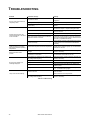
To clean the fan and air vents
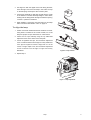
• Remove dust from the fans and air vents with a soft brush, cotton swab, vacuum, or compressed air.
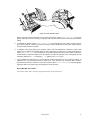
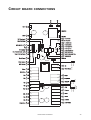
To clean or repl ace the air filters
1
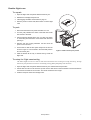
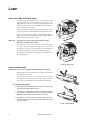
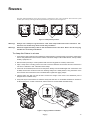
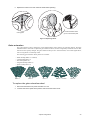
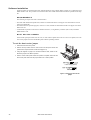
Disconnect the fixture from power. On each side of the head, remove the 2 screws that hold the side cover
using a Torx-20 screwdriver. Slide the cover forward to remove. Lift the filter off of the cover.
2
Clean the filters with a vacuum or compressed air, or replace them. If they are saturated with smoke fluid,
etcetera, soak them in warm soapy water and blot dry.
3
Place the filters on the covers and replace the covers.
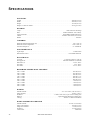
Figure 16:
Routine maintenance
25